tr is a site generator based on a collection of scribbles & racket programs.
You can use Ctrl + K (or Meta + K on MacOS) to toggle search bar.
Dependencies of the tool:
- racket: https://racket-lang.org/
- MacTex: https://www.tug.org/mactex/
- dvisvgm: https://dvisvgm.de/
- deno: https://deno.com/
Take a look at guide to get start.
Guide [guide-0000]
Guide [guide-0000]
This guide explains how to use this project and what is expected behaviour.
Setup [guide-0001]
Setup [guide-0001]
Steps to setup the project:
- Run
raco pkg install --auto trin the project - Creates a directory
mkdir your-siteand goes into it - Run
raco tr initthen updatesite.json(check Shell Commands for more CLI interaction)
raco tr init do the following
- Create
.gitignorewith_tmp/ _build/ assets/
- Create
site.jsonwith{ "domain": "your domain", "title": "your site title", "description": "your site description" } git clone https://git.sr.ht/\~dannypsnl/tr-assets assetsCreate directory
contentandcontent/postgit init
Now you can add some *.scrbl in content/ directory as you wanted. Each *.scrbl is called a card.
Directory content/post is treated specially in that RSS only use cards in this directory as items.
A card addr.scrbl (no matter its full path) has an address addr, and the address must be unique in the whole TR project.
The content of card mostly are just HTML in at-exp form, scribble HTML describes more about what can be used.
Further guide will teach you what's in the toolbox.
Configuration [guide-0009]
Configuration [guide-0009]
By default, the configuration file is site.json, in some tr command you can config to use different configuration (read CLI --help result to learn).
{
  "domain": "your domain",
  "title": "your site title",
  "description": "your site description"
}
Optional options are
"output-path", default value is"_build", wheretr buildcommand produces files for publish. You can runpython3 -m http.server -d _build
to view result, or upload it to host.
"mode", default value is"release". When the value of"mode"is"dev", TR producessourcemap.jsonin the output path, that enables Meta/Ctrl + E to edit the current page.
Metadata [guide-0002]
Metadata [guide-0002]
There are several metadata can be set to a card, list as below:
@taxon{...}it accepts a text@title{...}it accepts a list of forms@author{...}it only accepts a card address@author/literal{...}it accepts a text@date{...}it accepts a text, but I suggest inyyyy/mm/ddformat@doi{...}it accepts a DOI format like10.1145/3571239@orcid{...}it accepts a ORCID format text@meta/text{...}it accepts arbitrary text as metadata@meta/link{...}it accepts a link@toc/depth[n]it accepts an integer, which is the depth of generated TOC, the default value is2
Example. A Regular card [guide-0008]
Example. A Regular card [guide-0008]
Here I made an example to show what will actually be put in your *.scrbl file.
@date{2025-07-05}
@taxon{Example}
@title{A card}
@author{people-addr}

@p{Hello, brabrabra...}
Link to other cards [guide-0003]
Link to other cards [guide-0003]
You can use @mention{addr} to mention a card, it will tell addr it has a backlinks, e.g. I can mention the guide itself Guide. If the mentioned card has taxon Reference, it will not be a related card, but a references card, let me mention a cool book as an example 10 PRINT CHR$(205.5+RND(1)); : GOTO 10.
You can use @transclude{addr} to include a card, it will tell addr it has a context. This guide itself is an example of transclude.
Embed external web page
Since you can use any HTML, iframe for sure is counted, you can embed external web page, e.g.
Math Support [guide-0004]
Math Support [guide-0004]
tr use Katex in two forms: @m{...} and @mm{...}. One for inline and one for block, e.g. @m{a \in \R} produces
; @mm{ \int_{a}^{b} x^2 \,dx } produces
Except Katex, tr also supports backend LaTeX solution, you can put tikz program in @tikzcd{...} block to draw quiver, for example
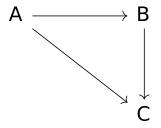
Or @texfig{...} for more flexible input (anything allowed in LaTeX document block). For example
@texfig{
...
}
If you want to use packages, write as below (the change is introduced since texfig now must manually assigns LaTeX header part)
@texfig[#:header @"
\\usepackage{tikz}
\\usetikzlibrary{spath3, intersections, backgrounds}
"]{
...
}
We support @typst{...} which use Typst as backend, check Typst backend for more information.
Immediate card [guide-000A]
Immediate card [guide-000A]
We are not always want to create a new file for a card, especially it's more like a subsection of the current article, you can use tr/card in this situation, check tr/card for more details.
Support Code in Card [guide-0007]
Support Code in Card [guide-0007]
You can write @tr/code{...} to extend card, for example
@tr/code{#lang racket
(provide (all-defined-out))

(define RR "\\mathbb{R}")
}
then you can use @m{@RR} to get
. Check tr/code for more details.
Shell Commands [guide-0005]
Shell Commands [guide-0005]
If you face error like raco tr cannot find such command, run raco setup.
- Run
raco tr buildto build HTMLs - Run
raco tr watchto watch content changes and build on fly - Run
raco tr nextto get next available address, for example, you might like to runvi $(raco tr next xxx).scrbl
to work on a new file (replaceviwith any command line editor command) - Run
raco tr metato get metadata of address, I recommend you use| jq .after the command to get pretty output.
Special form [guide-0006]
Special form [guide-0006]
There are some special forms for certain purpose
@bibtex[...]it accepts a string that is bibtex format
Posts [posts]
Posts [posts]
Tool. Use tr-agda to create literate agda card [tr-agda]
Tool. Use tr-agda to create literate agda card [tr-agda]
To create literate agda integration for tr-notes, I publish a new tool https://git.sr.ht/~dannypsnl/tr-agda, usage is
uv run tr-agda $(raco tr next ag)
You can provide title and taxon
uv run tr-agda $(raco tr next ag) --title [TITLE] --taxon [TAXON]
Feature. tr/card [tr-card]
Feature. tr/card [tr-card]
This is the final feature in the plan, which allows you write
@tr/card{
  @title{Xxx}
  @taxon{Feature}

  @p{Some words......}
}
Which creates an immediate card in current card, let me demonstrate an instance:
Demonstration. A demonstration [local-0]
Demonstration. A demonstration [local-0]
Demonstrate tr/card
To be simple, this feature only allows metadata title and taxon, otherwise you must create a new file.
Use python livereload to create livereload server [tip-0000]
Use python livereload to create livereload server [tip-0000]
I also use the following approach
from livereload import Server, shell
server = Server()
server.watch('content/**/*.scrbl', shell('raco tr build'))
server.serve(root='_build', port=8000)
Code is very simple (because the work of livereload module), we simply watch scribble files in content/ directory, and serve at port 8000.
Break. Update syntax of mention form [mention-0000]
Break. Update syntax of mention form [mention-0000]
The usual way @mention{addr} still work, but link text part is different, the old one is
@mention[#:title "link text"]{addr}
Now must be
@mention["addr"]{link text}
This is because the following syntax only be parsed properly in this way, in scribble at-expr
@mention["addr"]{@m{S}}
Feature. tr/code [trcode]
Feature. tr/code [trcode]
@tr/code{...} is a new feature to help users create their own extension for card, for example, you can add math macro
@tr/code{#lang racket
(provide (all-defined-out))

(define RR "\\mathbb{R}")
}
Or use this to fetch cards you want to transclude:
@tr/code{
(require tr/metadata)

(define scrbl-list (find-files (lambda (x) (string-contains? (path->string (file-name-from-path x)) "guide")) "content"))
(define addr-list
  (for/list ([path scrbl-list])
    (compute-addr path)))
}
Then I can use @ol[@(for/list ([addr addr-list]) (li addr))] to list these addresses:
- guide-0000
- guide-0001
- guide-0002
- guide-0003
- guide-0004
- guide-0005
- guide-0006
- guide-0007
- guide-0008
- guide-0009
- guide-000A
The form can be placed as any top-level form, so you can have
@tr/code{...}
@p{...}
@tr/code{...}
But you must have #lang [language] line in the first @tr/code{...} to decide your language.
Feature. Typst backend [typst]
Feature. Typst backend [typst]
We support Typst as backend now, below are example:
@typst{
#set page(width: 10cm, height: 4.5cm, margin: 0.5cm)
$
nabla · bold(E) &= frac(rho, epsilon_0) \
nabla · bold(B) &= 0 \
nabla × bold(E) &= -frac(partial bold(B), partial t) \
nabla × bold(B) &= mu_0(bold(J) + epsilon_0 frac(partial bold(E), partial t))
$
}

@typst|{
#import "@preview/fletcher:0.5.8" as fletcher: diagram, node, edge
#set page(width: 8cm, height: 4cm, margin: 0.3cm)

#diagram(cell-size: 15mm, $
        G edge(f, ->) edge("d", pi, ->>) & im(f) \
        G slash ker(f) edge("ur", tilde(f), "hook-->")
$)
}|

Tool. bib2tr [bib2tr]
Tool. bib2tr [bib2tr]
A tool converts bib file to scribble cards, https://git.sr.ht/~dannypsnl/bib2tr.
Usage [local-0]
Usage [local-0]
Convert a BibTeX file to tr-notes format:
bib2tr -b bibliography.bib content/refs
Convert a DOI to tr-notes format:
bib2tr -D 10.1000/182 content/refs
Tool. html2scrbl [html2scrbl]
Tool. html2scrbl [html2scrbl]
A web tool to convert input HTML to scribble/html, https://dannypsnl.github.io/html2scrbl/.
Break. texfig now must manually assigns LaTeX header part [texfig-0000]
Break. texfig now must manually assigns LaTeX header part [texfig-0000]
Form @texfig{...} at before implicitly do
\usepackage{quiver}
\usepackage{tikz}
\usetikzlibrary{spath3, intersections, backgrounds}
for users, now they are removed. Hence you must write it out explicit
@texfig[#:header @"
\\usepackage{tikz}
\\usetikzlibrary{spath3, intersections, backgrounds}
"]{
...
}
The output Tex file you will get is
\documentclass[crop,dvisvgm]{standalone}
\usepackage{tikz}
\usetikzlibrary{spath3, intersections, backgrounds}
\begin{document}
...
\end{document}
Policy of breaking changes [policy-0000]
Policy of breaking changes [policy-0000]
Since TR is a finished software (https://josem.co/the-beauty-of-finished-software/), every non-customize behaviour and already worked functions will not be removed, if you found your old cards stop working, reports to https://github.com/dannypsnl/tr/issues. I can't say there won't have any exceptions, but most problems should be counted as TR's bugs, and hence should be fixed.
Due to early experimental code, tikzcd and texfig is unstable.
The styling isn't belongs to above promise, I can only say I would avoid to touch them as possible. For example, recently I want to minimize table of content on mobile to improve UX, but except that, I will not change code of assets.
If a necessary breaking change is made, I will create a new post here that explain how to fix it.